global:
http://www.gnu.org/software/global/
装好后, 去到代码目录:
$ cd src
$ gtags
.emacs
;;global
(autoload 'gtags-mode "gtags" "" t)
(gtags-mode 1)
(global-set-key (kbd "C-]") 'gtags-find-tag-from-here)
C-] 跳到定义
M-* 跳回
global现在不支持python,浏览python代码用etags也足够了:
$ etags *.py
在emacs里,
M-. 第一次会提示你指定TAGS路径..然后会跳转到定义处.
M-* 跳回.
2009年3月19日星期四


2009年2月26日星期四
emacs ido
在emacs中打开和新建文件使用的是M-x find-file(即C-x C-f),如果文件不存在就创建一个新文件。默认的提示输入文件名的方式类似shell中的补全。
Emacs提供一个很好的补全方式──ido-mode
The ido.el is now a default elisp package in Emacs 23.
You can get the newest version from CVS.
Use following elisp to enable ido-mode:
(require 'ido)
(ido-mode t)
一些命令:
C-f to return to normal find-file
C-d to enter dired.
C-l to run ido-reread-directory to refresh the current work directory.
C-j to stop automatically completing file names. For example, you have "test.01" and "test.02" in your work directory, but you want to create a new file "test" instead of finding "test.01" or "test.02". Then you should type C-j after inputting "test", to run ido-select-text.
Tab or ? to show completion help.
2009年2月20日星期五
重新编译了emacs 23
1.下载emacs23代码 (2月初放出来的pretest)
http://alpha.gnu.org/gnu/emacs/pretest/emacs-23.0.90.tar.gz
或者通过cvs下载最新的代码:
cvs -z3 -d:pserver:anonymous@cvs.sv.gnu.org:/sources/emacs co emacs
2. 编译安装
让emacs支持xft字体
./configure --enable-font-backend --with-xft --with-freetype --with-x-toolkit=gtk
make bootstrap
make info
make install
3. 写~/.Xresources 文件
Xft.antialias: 1
Xft.hinting: 1
Xft.hintstyle: hintfull
Emacs.FontBackend: xft
4. .emacs 设置
(set-default-font "Bitstream Vera Sans Mono-13")
(set-fontset-font "fontset-default"
'gb18030 '("WenQuanYi Bitmap Song" . "unicode-bmp"))
5. 启动时添加选项 --enable-font-backend (好像非必须)
6. 上pp

参考: http://fxl.blogbus.com/logs/11846673.html
2009年1月7日星期三
Firemacs - Yet another Good Firefox Addon
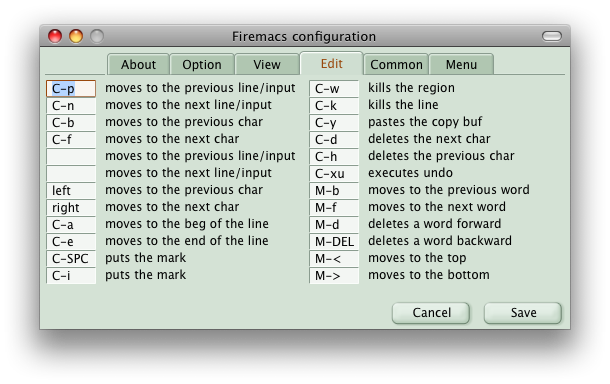
作者主页:
http://www.mew.org/~kazu/proj/firemacs/
下载: https://addons.mozilla.org/firefox/4141/
装上之后, 现在firefox里编辑就像emacs一样鸟。哈哈, Good!
2008年12月23日星期二
Semantic配置C++自动补全
先上pp, 点击查看大图:

( 我输入了"v.pu" 自动补全为v.push_back, 按一下tab确认)
Semantic is part of cedet(Collection of Emacs Development Environment Tools)
下面内容主要参考这篇文章:
1. Check out the latest cedet src:
2. Build cedet:
3. Install:
copy the cedet dir to your emacs site-lisp:
/usr/share/emacs/23.0.60/site-lisp/ (press 'ctrl-h v load-path' in emacs to see it)
4. 配置 (.emacs)
附录: g++ option:

( 我输入了"v.pu" 自动补全为v.push_back, 按一下tab确认)
Semantic is part of cedet(Collection of Emacs Development Environment Tools)
下面内容主要参考这篇文章:
1. Check out the latest cedet src:
cvs -z3 -d:pserver:anonymous@cedet.cvs.sourceforge.net:/cvsroot/cedet co -P cedet
2. Build cedet:
cd cedet
touch `find -name "Makefile"`
make bootstrap
3. Install:
copy the cedet dir to your emacs site-lisp:
/usr/share/emacs/23.0.60/site-lisp/ (press 'ctrl-h v load-path' in emacs to see it)
4. 配置 (.emacs)
(require 'cedet)
- 通过下面方式查看g++ include paths:
freestyler@effarr:~/program$ touch dummy.cpp
freestyler@effarr:~/program$ gcc -v -E -P dummy.cpp
使用内建 specs。
目标:i486-linux-gnu
配置为:../src/configure -v --enable-languages=c,c++,fortran,objc,obj-c++,treelang --prefix=/usr --enable-shared --with-system-zlib --libexecdir=/usr/lib --without-included-gettext --enable-threads=posix --enable-nls --with-gxx-include-dir=/usr/include/c++/4.2 --program-suffix=-4.2 --enable-clocale=gnu --enable-libstdcxx-debug --enable-objc-gc --enable-mpfr --enable-targets=all --enable-checking=release --build=i486-linux-gnu --host=i486-linux-gnu --target=i486-linux-gnu
线程模型:posix
gcc 版本 4.2.3 (Ubuntu 4.2.3-2ubuntu7)
/usr/lib/gcc/i486-linux-gnu/4.2.3/cc1plus -E -quiet -v -P -D_GNU_SOURCE dummy.cpp -mtune=generic
忽略不存在的目录“/usr/local/include/i486-linux-gnu”
忽略不存在的目录“/usr/lib/gcc/i486-linux-gnu/4.2.4/../../../../i486-linux-gnu/include”
忽略不存在的目录“/usr/include/i486-linux-gnu”
头文件查找路径(用“:”分隔):
头文件查找路径(用“:”分隔):
/usr/include/c++/4.2
/usr/include/c++/4.2/i486-linux-gnu
/usr/include/c++/4.2/backward
/usr/local/include
/usr/lib/gcc/i486-linux-gnu/4.2.4/include
/usr/include
搜尋結果清單
- Add the following to your c++-mode-hook:
;;;;semantic
;;;;以下3个按机器适用的强劲程度排列,最下面的对机器需求最低。三选一。
;; (semantic-load-enable-gaudy-code-helpers)
;; (semantic-load-enable-code-helpers)

(semantic-load-enable-minimum-features)
(eval-after-load "semantic-c"
;;下面的路径是通过上面的方式查看到的
'(dolist (d (list
"/usr/include/c++/4.2"
"/usr/include/c++/4.2/i486-linux-gnu"
"/usr/include/c++/4.2/backward"
"/usr/local/include"
"/usr/lib/gcc/i486-linux-gnu/4.2.4/include"
"/usr/include"))
(semantic-add-system-include d)))

(eval-after-load "semantic-complete"
'(setq semantic-complete-inline-analyzer-displayor-class
semantic-displayor-ghost)) ;;; 这是补全弹出方式.

;;;建立这个目录先
(setq semanticdb-default-save-directory
(expand-file-name "~/.emacs.d/semanticdb"))

(local-set-key (kbd "M-/") 'semantic-complete-analyze-inline)
(local-set-key "." 'semantic-complete-self-insert)
(local-set-key ">" 'semantic-complete-self-insert)
附录: g++ option:
-v Print (on standard error output) the commands executed to run the stages of compilation. Also print the version number of the compiler driver program and of the preprocessor and the compiler proper.
-E Stop after the preprocessing stage; do not run the compiler proper. The output is in the form of preprocessed source code, which is sent to the standard output.
-P Inhibit generation of linemarkers in the output from the preprocessor. This might be useful when running the preprocessor on something that is not C code, and will be sent to a program which might be confused by the linemarkers.
2008年12月18日星期四
Emacs 查找大小写
Ctrl-s 如果输入关键字全是英文小字母, 则Emacs会进行不区分大小写(case insensitive)查找. 但如果输入的关键字中包含有大写字母, Emacs就会进行区分大小写(case sensitive)查找. 可以在查找过程中通过M-c键来切换区分大小写模式.
2008年12月4日星期四
emacsclient - tells a running Emacs to visit a file
在终端里, 想编辑一个文件的时候, 运行emacs file_to_edit, 会启动emacs, 然后慢慢地 load 你的~/.emacs, 尽管你之前已经开了个emacs了. 因为这个, 我还是喜欢用vi file_to_edit.
事实上, 可以使用emacsclient, 速度一流. 前提是 emacs 先启动 server 模式, 可以用 M-x server-start 来启动 server 模式,我在 ~/.emacs 里面加入 (server-start) 来自动启动 server。
这样就可以在终端里运行 emacsclient file_to_edit 了, 会自动跳到server里.
我嫌 emacsclient 太长, 我把它弄成 alias ec='emacsclient -n'
2008年11月24日星期一
Posting from emacs using e-blog.el
e-blog is a (currently) simple interface to the Gdata API for Blogger. It allows posting to a Blogger blog from within Emacs. Rather than presenting the user with buffers filled with XML to embed their posts in, e-blog presents a buffer similar to what you would expect from an MUA.
但我安装后它不work, 郁闷, 幸亏这位MM很强大,搞定了, 修改后的在这里.替换掉原来的e-blog.el后,还要去修改一下它, 把里面她的文件目录改成你的.
订阅:
博文 (Atom)
